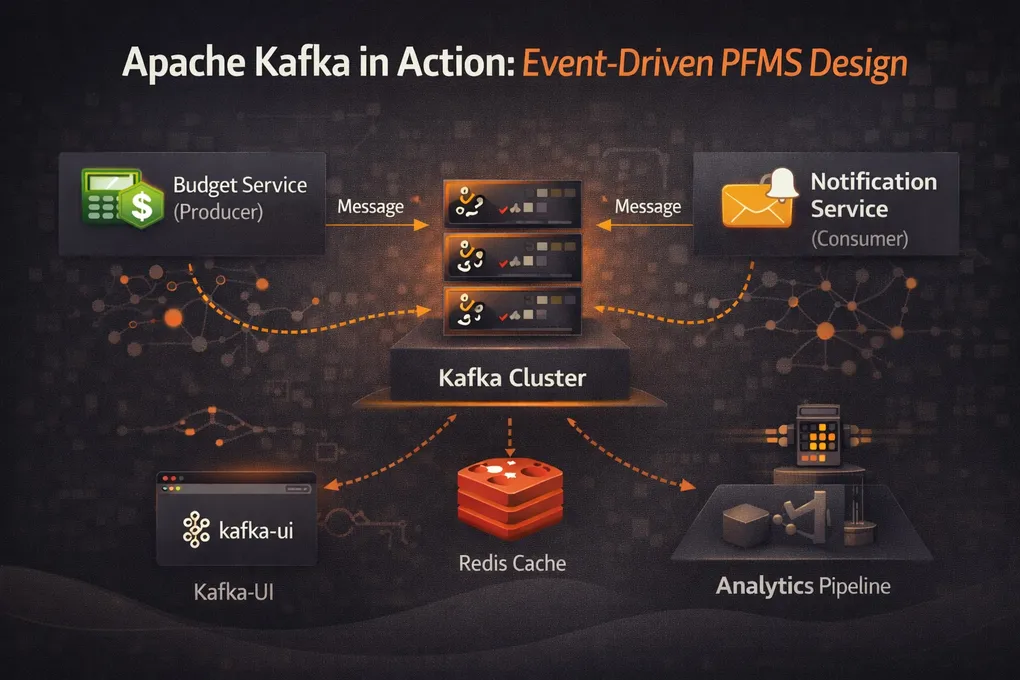
Building a Resilient Microservice Backbone with Kafka and Spring Boot
Introduction: From Synchronous Chains to Event-Driven Decoupling
In traditional microservice architectures, services often communicate via synchronous REST calls. While straightforward, this creates tight coupling: if the notification-service is down, the budget-service might fail to save a budget, or at least hang waiting for a response.
To build a truly resilient Personal Finance Management System (PFMS), we transitioned to an event-driven architecture using Apache Kafka. This allows services to publish events without knowing who consumes them, enabling asynchronous processing and fault tolerance.
Docker Setup: Orchestrating the Backbone
We use Docker Compose to spin up our Kafka cluster and monitoring tools. The configuration below defines three services: kafka (the broker), kafka-ui (a web interface), and portainer (container management).
A critical aspect of this setup is the network configuration. All services join the pfms-network, allowing them to communicate via service names (e.g., global-service-kafka) rather than IP addresses.
Key Environment Variables
KAFKA_ADVERTISED_LISTENERS: This is the most crucial setting. It tells Kafka how clients (our Spring Boot apps) should connect.INTERNAL://global-service-kafka:29092: Used by services running inside the Docker network.EXTERNAL://localhost:9092: Used by tools running on your host machine (like Kafka UI or your IDE).
KAFKA_LISTENERS: Binds Kafka to accept connections on all interfaces (0.0.0.0) inside the container.
docker-compose.yml
services:
  kafka:
    image: confluentinc/cp-kafka:7.5.0
    container_name: global-service-kafka
    ports:
      - "9092:9092"
    environment:
      KAFKA_NODE_ID: 1
      KAFKA_LISTENER_SECURITY_PROTOCOL_MAP: 'INTERNAL:PLAINTEXT,EXTERNAL:PLAINTEXT,CONTROLLER:PLAINTEXT'
      KAFKA_ADVERTISED_LISTENERS: 'INTERNAL://global-service-kafka:29092,EXTERNAL://localhost:9092'
      KAFKA_INTER_BROKER_LISTENER_NAME: 'INTERNAL'
      KAFKA_CONTROLLER_LISTENER_NAMES: 'CONTROLLER'
      KAFKA_OFFSETS_TOPIC_REPLICATION_FACTOR: 1
      KAFKA_GROUP_INITIAL_REBALANCE_DELAY_MS: 0
      KAFKA_PROCESS_ROLES: 'broker,controller'
      KAFKA_CONTROLLER_QUORUM_VOTERS: '1@global-service-kafka:29093'
      KAFKA_LISTENERS: 'INTERNAL://0.0.0.0:29092,EXTERNAL://0.0.0.0:9092,CONTROLLER://0.0.0.0:29093'
      CLUSTER_ID: 'MkU3OEVBNTcwNTJENDM2Qk'
    networks:
      - pfms-network

  kafka-ui:
    image: provectuslabs/kafka-ui:latest
    container_name: kafka-ui
    ports:
      - "9094:8080"
    depends_on:
      - kafka
    environment:
      KAFKA_CLUSTERS_0_NAME: local-cluster
      KAFKA_CLUSTERS_0_BOOTSTRAPSERVERS: global-service-kafka:29092
      DYNAMIC_CONFIG_ENABLED: 'true'
    networks:
      - pfms-network
  portainer:
    image: portainer/portainer-ce:latest
    container_name: portainer
    restart: always
    ports:
      - "9443:9443"
      - "9000:9000"
    volumes:
      - /var/run/docker.sock:/var/run/docker.sock
      - portainer_data:/data
    networks:
      - pfms-network
networks:
  pfms-network:
    name: pfms-network # This forces the name to be exactly 'pfms-network'

volumes:
  portainer_data:
The Full Event Chain: Budget Save → Kafka → Notification
When a user creates a budget, the event doesn’t go straight to Kafka. There are three classes involved, and the ordering matters for data consistency.
Step 1: Save and Publish a Spring Event
BudgetService.saveBudget() saves to the database inside a @Transactional boundary, then publishes a Spring application event — not a Kafka message.
// budget-service/.../service/BudgetService.java
@Transactional
public Budget saveBudget(Budget budget) {
    Budget savedBudget = this.budgetRepository.save(budget);
    BudgetNotification notification = budgetMapper.toNotification(savedBudget);
    eventPublisher.publishEvent(notification);  // Spring event, not Kafka yet
    return savedBudget;
}
Step 2: Post-Commit Handler Triggers Kafka
The BudgetNotificationHandler listens for that Spring event, but only fires after the database transaction commits. This is the key reliability guarantee: if the DB save fails and rolls back, no Kafka message is ever sent.
// budget-service/.../producer/BudgetNotificationHandler.java
@Component
public class BudgetNotificationHandler {
    private final BudgetNotificationProducer budgetNotificationProducer;

    @Async  // Runs on a separate thread pool
    @TransactionalEventListener(phase = TransactionPhase.AFTER_COMMIT)
    public void handleBudgetNotification(BudgetNotification request) {
        budgetNotificationProducer.sendBudgetRequest(request);
    }
}
The combination of @TransactionalEventListener(phase = AFTER_COMMIT) and @Async means: wait for the DB commit, then send the Kafka message on a background thread so the HTTP response isn’t blocked.
Step 3: The Kafka Producer
// budget-service/.../producer/BudgetNotificationProducer.java
@Service
public class BudgetNotificationProducer {
    private final KafkaTemplate<String, BudgetNotification> kafkaTemplate;
    private static final String TOPIC = "notification_requests_topic";

    @Async
    public void sendBudgetRequest(BudgetNotification request) {
        kafkaTemplate.send(TOPIC, request.getUserId(), request);
    }
}
Using request.getUserId() as the Kafka key ensures all events for the same user land on the same partition, preserving per-user ordering.
Step 4: The Consumer
The notification-service has a dedicated NotificationConsumer component (not the service class itself) that listens on the topic and delegates:
// notification-service/.../consumer/NotificationConsumer.java
@Component
public class NotificationConsumer {
    private final NotificationService notificationService;

    @KafkaListener(topics = "notification_requests_topic", groupId = "notification-service-group")
    public void listen(NotificationRequest request) {
        notificationService.sendNotificationAsync(request);
    }
}
Testing the Event Chain with Embedded Kafka
You don’t need a running Kafka broker to test this. Spring’s @EmbeddedKafka spins up an in-process broker:
// notification-service/.../consumer/NotificationConsumerTest.java
@SpringBootTest
@DirtiesContext
@EnableKafka
@EmbeddedKafka
@ActiveProfiles("dev")
public class NotificationConsumerTest {

    @Autowired
    private KafkaTemplate<String, NotificationRequest> kafkaTemplate;

    private static final int MESSAGE_COUNT = 5;
    private static final String TOPIC = "notification_requests_topic";

    @Test
    void testConsumerReceivesAndProcessesMessage() throws Exception {
        NotificationService.processedMessageCount.set(0);

        for (int i = 0; i < 5; i++) {
            NotificationRequest request = new NotificationRequest(
                1L, "user" + i, "Test Subject " + i, "Test Body " + i, "EMAIL"
            );
            kafkaTemplate.send(TOPIC, request.getUserId(), request).get(1, TimeUnit.SECONDS);
        }

        Awaitility.await()
            .atMost(10, TimeUnit.SECONDS)
            .pollInterval(200, TimeUnit.MILLISECONDS)
            .untilAsserted(() -> {
                assertEquals(MESSAGE_COUNT, NotificationService.processedMessageCount.get());
            });
    }
}
Awaitility is the right tool here — Thread.sleep() is unreliable for async assertions. The test produces 5 messages, then polls until all are consumed or 10 seconds elapse.
Conclusion
By leveraging Apache Kafka and Docker, the PFMS architecture achieves high scalability and resilience. Services are decoupled; failures in the notification-service no longer block the budget-service. The pfms-network ensures seamless internal communication, while the event-driven pattern lays the foundation for complex, real-time features like fraud detection and automated reporting.